Introduction
This document describes how to enable and manage public IP functionality for workspaces in the Admin Portal. It also outlines important security and cost implications that administrators must communicate to users before enabling this feature.
Manage public IP from Admin Portal
Use this procedure to allow a workspace’s Accountable and Privileged Members to assign public IP addresses to their virtual machines (VMs). Enabling this feature does not automatically assign public IPs; it only grants the capability to manage them within the workspace. By default myDRE workspaces do not have public IP allocated to the VMs.
Please note that assigning public IP to VMs is only possible on Windows VMs!
How to configure public IP management
- Open the Admin Portal.
- Locate the workspace that requires the ability to assign public IPs to its VM(s).
- In the public IP management section, click Enable.
- Confirm the change if prompted.
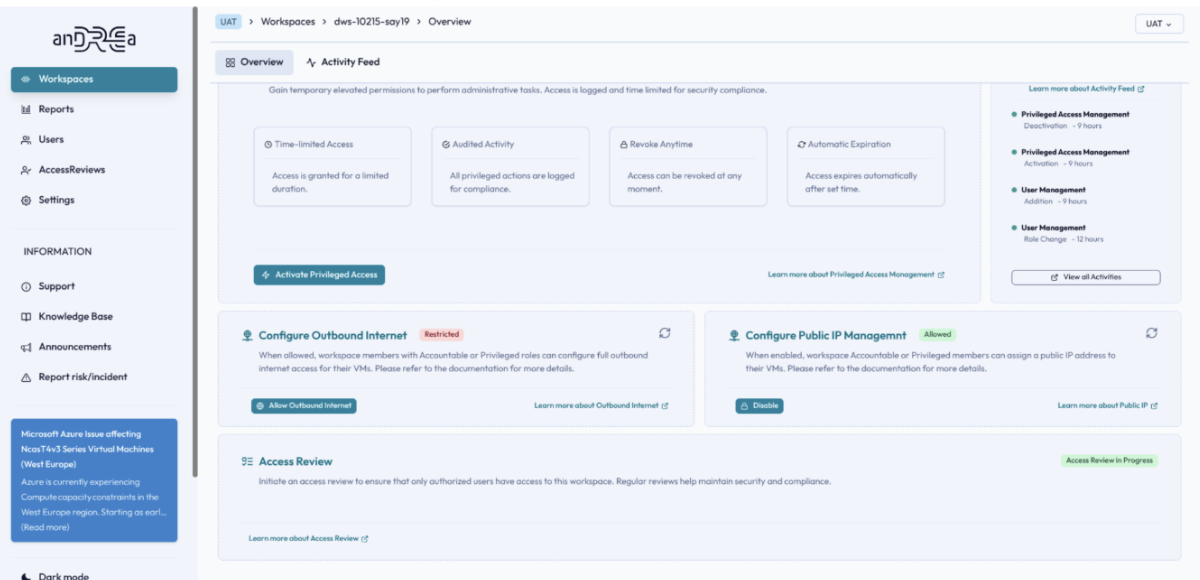
After you enable this setting, Accountable and Privileged Members in that workspace can assign public IP addresses to their VM(s) as needed. As Research support you can at all times disable the configuration for the workspace Accountable or Privileged member to manage public IP on the workspace level. Please note that if this is disabled, the public IP cannot be removed from the VMs where this is already configured.
- Adding a public IP to a VM may increase data exposure and security risks; ensure users understand they must secure their systems appropriately.
- Public IPs generate additional costs; inform users about potential cost impact before enabling this feature. See Azure pricing or use myDRE cost estimator for a rough estimate.
- You can disable public IP management for a workspace at any time; this prevents Accountable and Privileged Members from managing public IPs, but existing public IPs on VMs are not removed or changed.
- Enabling public IP management only grants the ability to manage public IPs; Accountable and Privileged Members must still explicitly assign a public IP to each VM that requires it.
- Public IP can only be assigned to Windows VMs.