Introduction
This document serves as the design for accessing on-premises fileservers (also referred to as external fileservers) from a myDRE workspace. The design was created based on IRots in combination with Yoda, but is generalized for similar challenges.
The design is reviewed and found to be acceptable by anDREa if a client does need it Implementing the design needs a signoff on the implications (see this document) by your Security Officer and Department Head
Design
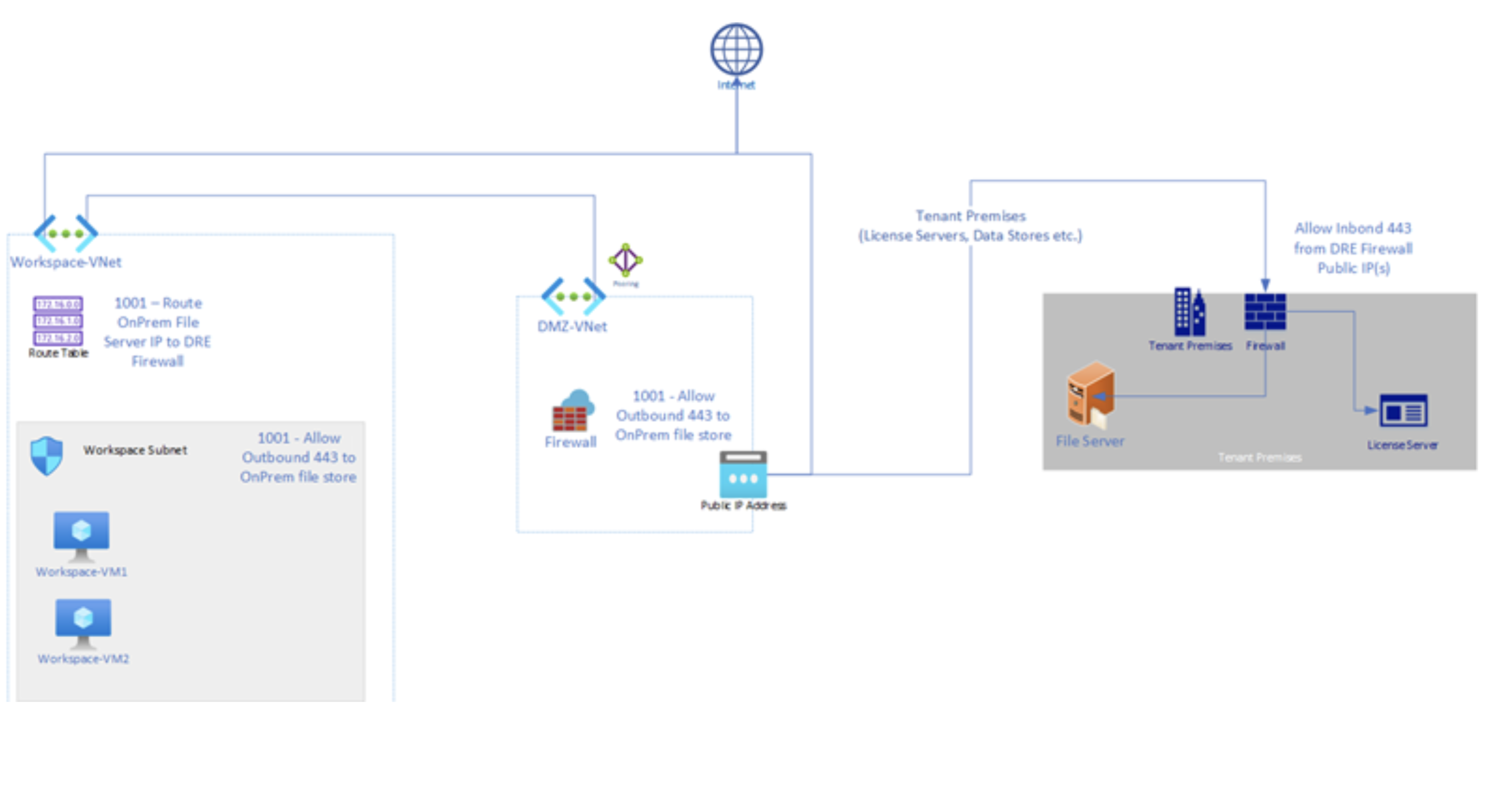
The figure on the right shows the external fileserver access functionality. This figure has been simplified to only show the resources relevant to the file transfer functionality.
- The setup consists of a firewall rule, a route in the workspace route table and a network security group rule in the workspace.
- All the related infrastructure components are hosted in an Azure Account owned and operated by anDREa Consortium.
- DRE workspaces are provided access to on-premises fileservers by allowing outbound connections on port 443 to the specified fileserver.
-The anDREa firewall allows outbound requests to the on-premises firewall's public IP on port 443.
- This access will only be granted for requests originating from a myDRE workspace within the matching tenant’s subscription.
- Workspace subnets allow outbound requests to the on-premises firewall's public IP on port 443.
:::Note [Note] this is not the default behavior for a workspace; opening these ports will only be done upon an approved ticket request (see: Outside SLA Request (myDRE.org)).
Requests to the on-premises fileserver are routed through the anDREa firewall first. :::
Recommendations
- Add the myDRE firewall IP-range to the on-premises firewall's whitelist, allowing only access on port
443(Presumably used by MU Fileserver based on prior discussion). - File transfer software is not provided within the myDRE workspaces. Recommended to provide users with instructions to install the desired file transfer software on their myDRE workspaces.
- Enforce the use of file transfer protocols that have encryption in transit, i.e. SSL or SFTP.
- Use a different port for fileserver access if possible. Allowing access on a generic port like
443may lead to unintended access to other on-premises services that also use this port.
Impact on SLA
Opening up access to on-premises networks potentially compromises the security and integrity of a myDRE workspace. As such anDREa cannot guarantee that workspaces with this functionality are secure, nor can anDREa guarantee the integrity of the files within these workspaces.
- Availability of the on-premises fileserver.
- Availability of the connection to the on-premises fileserver.
- Configuration of the on-premises fileserver.
- Use of unencrypted file transfer protocols.
- A myDRE workspace being compromised as a result of these file transfers.
- A myDRE workspace being compromised as a result of the newly opened ports.
- Any on-premises service being compromised as a result of access on port
443through a myDRE workspace.
- Auditing of the requests made to the on-premises fileserver.
Impact on CIA-classification
Impact on Confidentiality
Within the context of a standard Workspace it is demonstrable who was allowed to have and had access to data. With direct access to on-premises storage this is no longer possible. The Workspace Accountable must take measures and must accept the remaining risks or find a way to mitigate.
Impact on Integrity of the data
The data share of a Workspace is snapshotted every 24 hours and users can restore a version of the data up to 30 days back. Further, due to the isolation of the data share within the Workspace, the data is protected against ransomware risks caused by users in other Workspaces. By using on-premises storage the Accountable must take measures and must accept the remaining risks or find a way to mitigate.
Impact op Availability
The maintenance, support, and availability of on-premises storage is not covered by anDREa SLA. Also the access between client on-premises storage and the mydre Workspace is not part of the anDREa SLA. By using on-premises storage the Accountable must take measures and must accept the remaining risks or find a way to mitigate.
Costs
Costs for the file transfer functionality are based on the amount of data being processed by the Azure firewall. For both ingress and egress of data the price sits at €0.014 per GB processed. These costs can be billed in part or full without additional notification or agreement. The breakdown will be an approximation as there is no transparent way to calculate exact costs per tenant in a shared Firewall.